Airborne Satellite Weather Data
This article was written in 2009 and has been sporadically updated since. The last updates are at the end.
Objective
A pilot normally obtains a weather briefing before departure and for most short flight this is sufficient. However, on a long flight, airborne weather updates enable a diversion to be executed early, rather than flying all the way to the destination and discovering it is fogged-in, and having to proceed to the alternate on reserve fuel, with any problem at the alternate resulting in an emergency. In parts of Europe, the alternate options are poor, often with the only realistic option not having Avgas or Customs. Often, the alternate is some dump where you do not want to be at all. Most modern airlines have this facility using ACARS and the benefits are obvious.
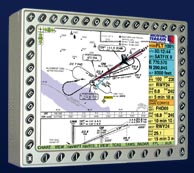
In the USA there are satellite based services which carry aviation weather but Europe is way behind. One German company, MT, offers a service based around their own data servers and their own custom made tablet computer
but this is a very expensive product. Avidyne are now offering the MLX770 system (brochure)
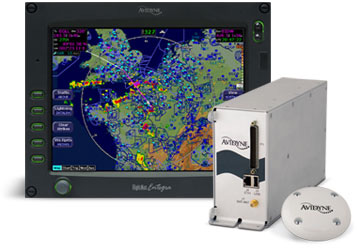
which is also very expensive unless you already have a compatible MFD, and even then it costs a lot for the rest of the system and its installation, plus the satellite data subscription. These products offer a weather radar image which is geo-referenced around the aircraft position, which is a nice feature.
"Executive Summary"
The objective of this project was to find out whether an easy solution exists that provides METARs, TAFs, and perhaps some graphical weather data, using an off the shelf satellite phone linked to a tablet computer, laptop or a PDA.
Having explored a number of dead ends, the project was eventually successful.
Where does the weather data come from?
In Europe, weather data is commercially marketed, can be very expensive if you want near real-time, and any commercial service using it has to license it. Worldwide METARs/TAFs have been freely available for some years (mainly from the USA) and these are redistributed all over the internet to such an extent that few care about any copyright anymore, but radar data has only recently come out on the internet, in small sanitised doses which (like share prices) are time-delayed to limit usefulness. Meteox offers an image for much of Europe but only via a page filled with advertisements. Sferics data (lightning discharges) is now available free for all of Europe from several websites, collected by a network of volunteers feeding data into a server which plots it geographically. So, for personal use, there is enough "out there" to be useful. All you need is an internet connection...
Which satellite operator?
The principal networks are Globalstar, Immarsat, Iridium, and Thuraya. All the satelline phone networks offer both voice and data, and most offer both PAYG and contract tariffs. Iridium is probably the most commonly used network for commercial data in both aviation and ground based applications such as vehicle tracking; both MT and Avidyne above use it. Iridium went bust some years ago but are back up and running, with a network comprising of a large number of low earth orbit satellites. However, its basic data rate is just 2.4k bits/sec (around 200 bytes/sec) which costs £2/minute (dial-up) and its phones are £1000+. Iridium, together with other equipment manufacturers, are aggressively targeting many vertical applications including the aviation market but at a hefty price.
Thuraya was chosen for this project, primarily for its low price ($0.99/minute on dial-up), a good data rate (9.6k bits/sec), and compact phones. Thuraya is based in UAE, has cherry-picked the market by not providing worldwide coverage but instead covering a large area centred on the Middle East
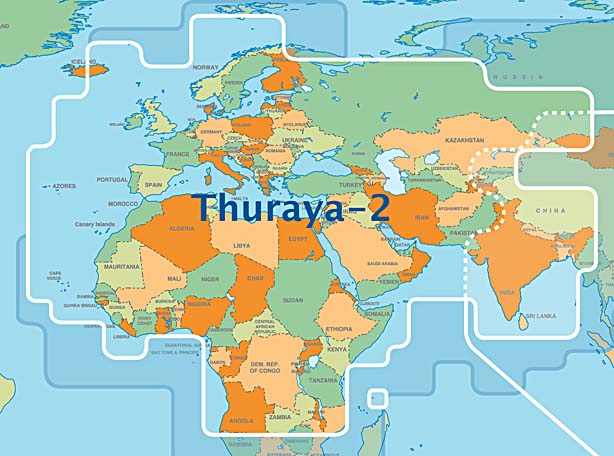
and is aggressively targeting the developing world with tariffs below traditional GSM rates. Their main satellite (Thuraya 2) is geostationary at 28 degrees East and therefore lies in the south easterly direction from the perspective of a European user. The phones run at 1525-1660MHz. Some technical information on Thuraya and others is here. The Wikipedia entry is here.
Thuraya does mention aviation applications here but this leads to a dead link and they have not responded to enquiries.
Unfortunately, Thuraya do themselves no favours with their "customer service" which is way short of what one would expect to be supporting such an executive / professional market product. Their responses to queries or problem reports are highly selective and often nonexistent. Faxes are ignored. However, they do monitor the internet for any mention of Thuraya and contact the writer if they don't like something! It is also easy to find web reports from mountaineering expeditions who had a lot of Thuraya kit and found it barely usable for certain functions, notably SMS and the POP email function (this project uses neither of these features). I expect that this, as well as the lack of U.S. coverage, is why everybody offering "professional" products/services has gone to Iridium despite the much higher cost.
Thuraya Costs
The following cost examples are as at August 2008 and were supplied by AST Systems who were extremely helpful in the supply of loan equipment for this project.
Thuraya costs are not on their website and - as is normal in mobile telecomms roaming charges - are difficult to establish. There is a complex matrix of tariffs, made worse - on contract SIMs - by the rate varying according to the caller's location. On the two PAYG tariffs ("Classic" and "ECO") the caller's location does not affect the tariff. Given the context of this article is internet data, voice calls are largely ignored but, in general, voice calls to land numbers cost around $1.50/minute and can be as low at $0.20/minute on a Thuraya-Thuraya voice call on the "ECO" PAYG SIM. However, voice calls to Thuraya numbers can be eye-wateringly expensive - I have just called one from my Virgin UK PAYG mobile and it is £6/minute.
The data call charge is $0.99/minute for dial-up data,
or $5/MB (charged in units of $0.05) for GPRS and amazingly this
applies to both PAYG (the "Classic" SIM) and contract. On PAYG these
rates are independent of the caller's location. The "ECO" SIM offers
a slightly lower dial-up rate of $0.76/minute but this tariff is believed to
be blocked when over water.
The three Thuraya phones are priced as follows: 7100 £380 SO-2510 £330 SG-2520 £575
The other costs are as follows:
PAYG
GPRS Activation fee: $20 one-off charge
The tariff chosen was the "Classic" SIM which is the main PAYG product. The prepaid packs (scratch cards) come in various sizes up to $160. There is a big catch: any remaining balance on the SIM is confiscated at the end of a time period which for the $160 pack is 12 months.
If your credit runs out, the phone is de-activated and you have to pay a re-activation fee which varies according to how long the credit has been lapsed for.
Top-up options: There are traditional scratch cards one can buy from the dealer, and there is a 3rd party topup facility operated by FoneRecharge who offer both a topup website and a means of topping up using the phone; the latter is a free call so it can be used even when the credit has run out. It is also possible to telephone a Thuraya dealer who will take your credit card details, scratch a card, and give you the magic number.
CONTRACT
Activation fee: $20 one-off charge
Monthly payment: $20 - this gives you voice only and does not enable GPRS or dial-up data.
Additional monthly payment to enable dial-up data: $5
Additional monthly payment to enable GPRS data:
$20/month (5.12MB GPRS data included, $0.05/10k thereafter)
$55/month (15.36MB GPRS data included, $0.05/10k thereafter)
$105/month (35.84MB GPRS data included, $0.05/10k thereafter)
PAYG or Contract?
With traditional GSM, the choice between PAYG and Contract depends on one's usage, because contract rates come with various benefits e.g. lower call rates, monthly call and data allowances, extended geographical coverage, and reduced administration because the account cannot run out and does not need to be topped up. Some networks (e.g. Virgin) blur the difference by offering a PAYG product with automatic (direct debit) topup which gives "contract" geographical coverage without the administrative burden.
With Thuraya satellite calls, the Contract option - suprisingly - does not offer cheaper calls, free calling time, or subsidised handsets. It has just two benefits: the ability (on dual-mode phones such as the SG-2520) to make outgoing GSM calls, and easier administration through the elimination of scratch cards (though this one is mitigated by the 3rd party FoneRecharge facility) and the provision of usage statements (no way to find out where the money is going on PAYG other than by doing a 151-call balance enquiry before/after a call). However, the contract rental for the basic dial-up data functionality costs $25/month i.e. $300/year which is a lot to pay for not having to buy a scratch card once a year. The rental for both dial-up data and GPRS functionality is even more - $540/year. The GPRS-inclusive contract option comes with some included data which is cheaper than the standard $5/MB rate but this has no value when you consider the monthly payment as well. Contract would make sense for heavy users and that is about it.
The phones are the same price regardless of PAYG or Contract. The prices shown above include various accessories but do not include car mounting kits, remote antennae, etc. In fact the reason why the 7100 (a refurbished price; they are no longer made) costs more than the new SO-2510 is because the usual accessories on it were priced separately.
For this application (airborne weather data) I believe PAYG offers the best value. The $160 scratch card, if purchased every year (as it must be because that's how long the money lasts for) is equivalent to a "contract rate" of $13.33/month which includes free calls worth $160 during that year. On GPRS, this is 32MB which would cover countless thousands of METARs/TAFs, and hundreds of weather radar images.
Update 1/2010: A new SIM card was introduced in May 2009 called the Thuraya Prepay SIM which replaced the Thuraya Super & Thuraya Classic SIM cards. The Thuraya Prepay SIM has the following changes: Call rates are 1.49 units per minute. This rate includes data calls. Annual fee of 39 units is automatically deducted by Thuraya from your prepaid account balance each year. Prepaid credit does not expire as long as your account is kept active by having enough credit to pay the 39 units on the anniversary of your account activation. More information here. This means that the monthly cost of having the service is now only 3.25 units (160 units cost US$168). For example, if you bought a new SIM card and recharged with 160 units and didn't make any calls, then after 5 years you would still have active SIM card. It's much better value, especially for people who only use it occasionally.
Built-in GPS - Necessary?
Thuraya phones contain a GPS receiver. Their "corporate position" is that a GPS position fix is mandatory to enable a call to be made. It is a fact - on some contract tariffs - that if you travel around, Thuraya bill you at different rates according to where the call was originated, so they are tracking your position somehow.While few users will care about being tracked (the privacy issue), it creates an operational uncertainty because the GPS receiver is often unable to obtain a fix if the telephone is powered up while moving at some speed.
The firmware design of any GPS receiver is to some extent a compromise: if the designer assumes that the phone is not moving (much) when switched on, it can be optimised to get a much faster fix. It appears that Thuraya have taken this option; their GPS gets a fix within seconds if not moving but is poor at speeds above slow traffic speeds.
Therefore, if Thuraya truly mandated a GPS fix for every call, their system would be barely usable due to the time it can take to get a GPS fix after the phone is switched on, and in fact would not work in many motor vehicle applications - yet they do sell car kits....
Fortunately, it's obvious from the most casual usage that GPS reception is not mandatory for making each and every call. When this project was first started in 2008, a fix had to be obtained only every 2-3 days. By late 2009, it became apparent that a daily fix was required. You can test this by using the phone indoors, where it has a Thuraya satellite view (e.g. horizontally through a window - in the UK, the Thuraya satellite is quite low on the horizon) but the building blocks any GPS satellite reception. When the phone requires a GPS fix, it indicates it with a flashing icon, and is totally useless until a GPS fix has been obtained.
The Thuraya satellite emits a large number of "spot beams" and can thus tell roughly where the caller is located. It has been suggested that Thuraya enforce a new GPS fix if the phone's last GPS position is inconsistent with the spot beam it is now communicating on, but I have pretty well disproved this in flight tests. Thuraya were contacted (8/2008) for a clarification of their policy on this, but declined to comment citing confidentiality of system design information. Eventually they said that the system will mandate a new GPS fix every "8-24 hours" or if the user moves more than 100km (which is highly unlikely to be true since the spot beam diameter is about 450km and I have done much longer flights than that with it). I am trying to establish the limits of the GPS fix policy but the only sensible advice at this time is to obtain a brief GPS fix prior to any flight and leave the phone switched on for the duration of the flight.
It is believed that a GPS fix is mandatory at the initial SIM card registration time following the new phone purchase - this is possible and isn't an issue. It's a good idea with any brand new GPS device to let it get a fix otherwise it can take ages (anything up to half an hour) to get one when you need one.
I discovered that the need for the GPS fix is tied to the combination of the actual phone and the SIM card. For example, if you obtain a GPS fix with one phone and then transfer the SIM card to another phone, the other phone will request a GPS fix. If you then transfer the SIM card to the original phone, that phone will request a GPS fix even though it had one only minutes before. One can only speculate as to the reason for this bizzare policy.
During internet research which I did to see if anybody else had come across these issues, I immediately found that half the world is making Thuraya interception equipment e.g. here. Since the GPS position - if available - is transmitted with every call, this is a great system for any country wanting to keep tabs on its mobile population. The data (the GPS position and the voice data) are claimed to be encrypted but evidently this has not stopped anybody...
Which weather data display device?
The phone's own display is not sufficient for the display of anything beyond brief textual data (METARs or TAFs) so a separate display device is required. For a portable solution, there are really only two possible display technologies: a portable computer or a PDA.
The former would be a tablet or a laptop. I use the LS800 tablet computer modified with a solid state 32GB hard drive
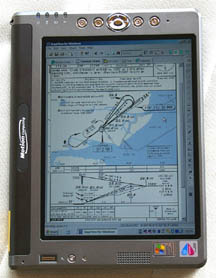
This project was continued with the LS800 tablet computer, but as this is a standard WinXP computer, everything here is applicable to any WinXP laptop also.
A PDA is a more compact option; I have used the HX 4700 PDA which has a VGA (640x480) display
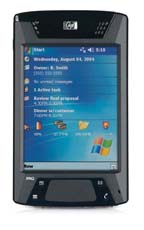
Despite the attractiveness of the 640x480 PDA approach (small size, low power and freedom from hard drive altitude dependencies) this was not pursued in this project. PDA software (Pocket/PC) is unreliable and crashes are common. Looking at the possible Thuraya phone data interfaces (USB, RS232, Bluetooth) few PDAs can act as a USB controller, few can be adapted with an RS232 port, so Bluetooth is the only practical method of connecting to a phone. Unfortunately, outside the mainstream retail market applications (mobile phone cordless headsets, etc) Bluetooth is even more flakey than Pocket/PC, and Thuraya's Bluetooth capable SG-2520 would not connect to the HX 4700 anyway...
The new low cost EEE PC products should work fine, where a conventional laptop is used.
It's easy to end up with a cockpit full of gadgets and interconnecting cables and I have tried hard to avoid this. Obviously the fully installed and certified solution (Avidyne) achieves this but at a huge cost, and I doubt anybody will be installing an Avidyne MFD just for weather data. Any low cost route involves the use of uncertified devices but these need to be portable, ar at least removable, and these take us back to the "messy cockpit" scenario. There are several approaches to alleviate the problem:
Bluetooth avoids the phone to display device interconnecting cable. So, a bluetooth phone whose battery lasts the flight duration avoids the need for any cable connection to it - it merely needs to be located where it can see the satellite.
For METARs/TAFs, the SG-2520 phone could itself act as a primitive web browser, though its sunlight readability is almost nil.
An rather different approach is to use an existing panel mounted MFD e.g. the KMD550 as the display device
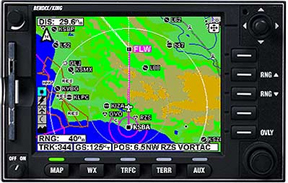
Most MFDs have NTSC video inputs (for weather radar data) and the resolution should be adequate for this application. I have done some tests with my KMD550, described here.
Obviously, most users would prefer to use something they are using already. I normally have the LS800 tablet computer running and to hand even if not referring to it, because I print off approach plates only for departure, destination, and alternate, and any others would be looked up on Jeppview running on the LS800.
A vital consideration is that the client display program should be a standard internet browser (Internet Explorer or Firefox). These are already provided and any departure from this generates a huge amount of software development work.
Who to connect to for the data?
One can obtain the data in two ways: connecting to the internet (which obviously allows access to any internet resource e.g. www) or by making a direct phone call into a private server (which has an auto-answer modem attached).
The private server method is the most efficient because it avoids all kinds of internet overheads (authentication, DHCP, DNS, TCP/IP protocol overheads, effects of long latency in the satellite connection, etc) and enables a chunk of data to be transferred in a call lasting just a few seconds. It also enables the use of an efficient non-error-corrected protocol for the delivery of weather images in which the loss of a small horizontal strip of the image is both obvious and not important. This efficiency is really desirable when using the Iridium system, due to its very slow data of 2400 bits/sec which is close to unusable for general internet access with graphics etc, and it appears that this is what MT have done.
Unfortunately, the server needs some custom software to be developed, and somebody has to finance, configure and maintain all this, and each modem can accept only one incoming call at a time. For lowest overall call cost, the modem should be a satellite modem rather than a conventional land-line modem, but the former are very expensive.
The private server based approach was thus not suitable for this project which was structured as a low cost scheme for private pilots. In this project, internet has been used, and this can be accessed via dial-up or Thuraya's GPRS.
In reality, the choice (internet versus a private server/modem) is not that clear cut. The great incentive to use the internet if at all possible is the elimination of having to maintain a bank of modems. One could use the internet and still avoid much of its overhead, by getting a fixed IP for each aircraft (which eliminates DHCP), by accessing a private proxy server on a fixed IP (which eliminates DNS), by using a compressing protocol (which eliminates the huge inefficiency of HTML), and even by using UDP streaming (which is ideal for graphical images which can tolerate some data loss, and doesn't care about the link latency). I think Avidyne have probably done something along these lines in their European product.
Satellite Antenna Options
Satellite internet is big business, in both high-end sailing and high-end (jet) aviation. There is some choice of aviation roof-mounted antennae such as these
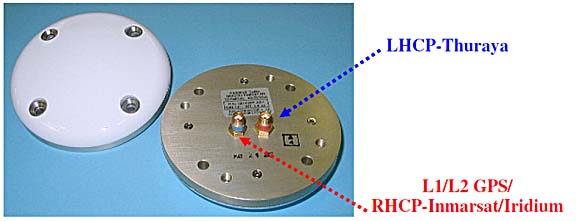
which are simple enough to install, using the traditional riveted reinforcing plate mounted on the inside surface of the hull.
Most of the commercial solutions use either Iridium or, at the top end, Immarsat. For Thuraya, one needs a dual-connector (satellite and GPS) antenna since the satellite phone also contains a GPS receiver. For Iridium, it appears that a single antenna might do because the two frequencies are very close to each other.
A rooftop antenna is without question the best technical solution which avoids the "blind spot" of flying directly away from the satellite in an aircraft which has a metal roof and no rear window, but because there is no practical way of connecting to the phone's antenna connectors, the phone has to be mounted in a car holder such as this one
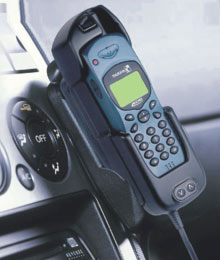
The above is the SatTrans holder for the Hughes 7100; there are a few other 3rd party Thuraya equipment vendors such as Teknobil in Turkey. I have found these to be about as uncommunicative as Thuraya itself... but the holders can be purchased from Thuraya dealers.
This is where one needs to be careful to keep the installation legal. The antenna is available TSO approved so that is the easy part. However, the Thuraya car holder does not come with "approved data" for an aircraft installation so would need to be approved by a Design Authority - FAA DER or EASA as appropriate, which is likely to be uneconomical.
The only practical way to do this legally is to install the antenna in accordance with standard avionics practice (a reinforcing plate inside the hull, a field approval, etc), bring its connections out to connectors (SMA or BNC) and keep the rest of the equipment "removable", with all cables passing through connectors so the car holder can be removed when the aircraft goes in for maintenance.
The satellite antenna having to be at least (roughly) 1m away from any other L-band (GPS, transponder, DME) antennae and these may need relocation which can be a lot of work. IFR GPS instalations are likely to require retesting for interference; I can report that during extensive testing I have never encountered any interference with avionics but many aeroplanes contain some dodgy wiring and could be affected.
This project concentrates on utilising the phone as it comes, with its internal antenna, and fortunately this works well and should be acceptable to a much wider user base. A later phase of this project continues with an installed rooftop antenna and an automated means of obtaining METARs and TAFs.
Phone Tests
Equipment tested in this article was kindly loaned by AST Systems in the UK; the SG-2520 phone was eventually purchased.
The airborne tests were done in a 2002 Socata TB20GT aircraft

which has a maximum level flight speed of 165kt but 220kt+ can be achieved (for phone test purposes) by descending with a tailwind.
All satellite phones have a common feature: An uninterrupted line of sight to the satellite (which lies roughly to the South East of the UK) is mandatory, and any thick or conductive object, including one's head or body, will block the signal. The phone is thus virtually useless in a moving road vehicle unless one is driving in very flat country with no trees, houses, hills or any other obstructions.
The phones have an extendable antenna which pulls out by about 100mm. It is recommended that the antenna points towards the satellite but in practice this is not important, and would make usage for voice calls rather awkward! It works fine with the antenna being vertical.
Various scare stories have been circulating concerning Doppler effects, allegedly rendering satellite phones unusable in aircraft. In this test, ground speeds up to 185kt (213mph) were tested, on various headings deliberately chosen to present the best and worst Doppler shift scenarios, and no effects whatsoever were noted. 185kt adequately addresses the piston engined aircraft scene; turboprops can reach 350kt but being pressurised they also have much smaller windows and the phone position will be all the more critical.
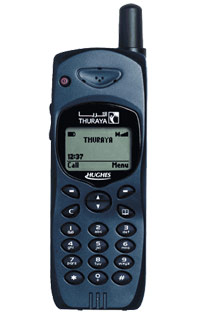
The first test was done with a now discontinued but still very popular - and widely available as a refurbished unit, both officially and on Ebay - Hughes 7100 satellite phone
Website (local copy) data sheet manual
AT Commands Reference (local copy)
The 7100 supports dial-up only, no GPRS. The connection to the phone is cable only; no bluetooth.
The phone worked perfectly. The claimed dial-up data rate of 9600 baud (roughly 1000 bytes/second) was readily achieved, with variations of 700-1300 depending on how strong the signal was.
Actual internet access is satisfactory - as fast as one can expect at 1000 bytes/second. The dial-up phase takes around 45 seconds, after which the billing starts, followed by a 15 second period for authentication and DHCP IP/DNS allocation.
The 7100 is a good solid reliable phone, with working firmware, no gimmicks (e.g. a camera), the best in the class battery life (measured at around 24hrs standby with no calls made), good dial-up data performance, a sunlight readable display, and lowest purchase cost.
It has the best GPS receiver of the phones tested; the only one which is capable of getting a fix in a moving aircraft (though it can take tens of minutes) and like the others it can send the GPS position as a text (SMS) message. On the ground, it takes around 1 minute to obtain a GPS fix, following power-up. The GPS position can also be obtained via its RS232 interface, using unusual AT commands (see the above AT Command manual). A continuously updated position is also obtainable using a special mode selectable on the keypad.
Unlike the later (bug-ridden) Thuraya phones, the 7100 hangs up within 3-4 seconds of receiving the hang-up command from the PC.
Its drawbacks are: no GPRS, no bluetooth, not manufactured anymore.
This phone would be ideal for a fixed rooftop-antenna installation because this sidesteps the connection and powering issues. However, the lack of bluetooth unavoidably means having a data cable to the display device - unless one connected it to an RS232-bluetooth transceiver module... This phone would also be my choice if I wanted a satellite phone for what most people would want one for: making phone calls!
For technical readers: the data interface on the phone itself is plain old RS232 and the phone presents a standard-ish Hayes modem port supporting the usual AT commands, with extensions (see link above). It should therefore work with any computer device which can drive a Hayes modem. Two cables are available: RS232 or USB. The USB cable is merely a USB to RS232 converter (based on the common PL2303 USB-serial chip used in most USB-serial products) which requires the installation of a driver (supplied on a CD) on the computer; the driver creates a virtual COM port which is normally the first unused COM port number (e.g. COM6). However, as with most Prolific-chip based USB-RS232 converters, the COM port # will change if you plug this converter into different USB ports on the same PC. I have found, with a terminal program, that the 7100 flawlessly supports SMS functionality via AT commands, as per the standard.
The 7100 has been around for a few years and a lot of companies e.g. Sattrans and Technobil have made accessories for it.
The 7100 was manufactured by Hughes. The remaining Thuraya phones are made in the Far East.
The next test was done with the Thuraya SO-2510 phone
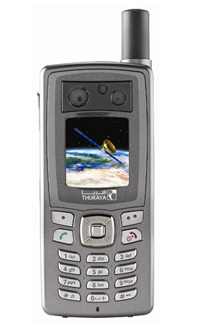
This supports both dial-up and GPRS data.
The tests with this phone were not successful.
The GPRS connection did deliver the claimed 60k bits/sec download speed when it connected, but it did not connect reliably. A good connection was obtained about 10% of the time, and it never lasted for more than a few minutes. The rest of the time, the connection failed in various ways, from not connecting at all following the standard GPRS *99# dial command, to connecting OK but with massive packet loss which was so bad that even the initial DHCP operation would fail so no IP was allocated.
The dial-up connection worked fine but the data rate was about 600 bytes/sec i.e. slightly more than half of what the 7100 delivered. The data rate difference was verified several times by swapping the same SIM card between the two phones and running both in the same position, with the antennae fully extended, etc, on the ground under a blue sky with a perfect view of the satellite.
Accordingly, no further tests were done.
The final test was done with Thuraya's then-top model; the SG-2520 phone
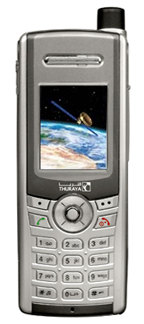
This was Thuraya's most modern phone which supports both dial-up and GPRS data, and connects to the computer using USB or bluetooth. It was eventually purchased and tested extensively.
Satellite reception is the best of the three phones tested, with a strong signal obtained through most double glazed windows. The SG-2520 supports both GSM and satellite, and Thuraya have roaming agreements with most GSM networks so the SIM card does not need to be changed. The GSM function works on PAYG but a Contract SIM is required to make outgoing calls.
Dial-up works fine, at close to the 9.6k advertised speed; ~1000 bytes/second. The connection suceeds very reliably.
GPRS works fine, at close to the 60k advertised speed; ~5000 bytes/second. The connection and authentication happen very fast (10-15 seconds) but with poor reliability which can be as low as 10%. A second phone (identical model) was tested about 6 months after this article was originally written and its performance was identical.
Bluetooth eliminates the data cable which, together with the fact that most flights are done on more or less the same aircraft heading all the way, enables a simple system whereby the phone is attached (with e.g. velcro) to one aircraft window when flying from A to B, and then moved to the opposite window when flying back.
Bluetooth connects flawlessly to the LS800 WinXP tablet computer and to another WinXP laptop, delivering dial-up and GPRS data modes, and fax. I was unable to get my HP4700 PDA to work - it found the phone and paired with it, but reported that the phone has no services it can use; I tried both FAX and DUN profiles. A more modern PDA might work.
The Bluetooth connection requires no driver installation on a PC which has Bluetooth support already. In the phone, it can be configured for "DUN" (dial-up networking) or "FAX", and both work equally for internet access. Most curiously, the FAX profile resulted in a ~15% higher data rate on dial-up, and ~5% on GPRS... but the DUN profile has better error recovery in the "hang up a lost connection and redial" scenario which is pretty common.
The Bluetooth FAX profile also works with Winfax. Fax appears to have little use while airborne but could be useful on the ground (for the usual reasons for which fax is handy in aviation; airport PPR being a common one) because not all terrestrial GSM networks support fax. I have Winfax already, on a GSM-enabled laptop, so this feature costs nothing extra to have. I suspect that nowadays most people - having an internet connection - will use an email2fax service instead. I did not test the phone with WinXP's built-in fax function, which definitely does not work with GSM fax modems.
The USB connection works fine. It requires the installation of a large software package on the PC which installs the USB drivers as well as Microsoft's Active Sync; fortunately the latter piece of bloat-ware can be uninstalled afterwards. The phone's USB interface can be configured to look like an active-sync device, or a modem. Both modes worked fine but active-sync is pointless in this application. The USB cable connector on the phone is far from sturdy but is fine for occassional use.
The phone has a 5V charging/power connector which draws a maximum of 1A. The Thuraya car cigar lighter charger accepts 11-32V input so would be usable in 28V aircraft. The input current was measured at 150mA at 28V, 350mA at 14V
Of the three phones tested, the SG-2520 was chosen for further work, largely because its Bluetooth function so much simplifies its usage in this specific application. However, it has major irritating drawbacks:
The Bluetooth enable status is not saved at power-down and the phone powers up with Bluetooth OFF. This firmware bug means you have to turn on Bluetooth after every power-up (if you are using Bluetooth).
On dial-up, there is a serious bug: disconnecting the network connection on the PC does not terminate the call, and this happens with both cable and bluetooth connections. The phone appears to ignore the standard modem disconnect commands. The phone sometimes hangs up by itself after a minute or two ($1-$2 later) but really needs the user to terminate the call manually using the phone's keypad. This bug may be present on GPRS but fortunately GPRS has no pressing need for a timely disconnection because you pay only for data transferred.
Occassionally, the phone crashes and a power-down is necessary. This rarely happens in normal data usage but the phone can crash so thoroughly when bluetooth device pairing has failed, or after a fax has been sent, that its battery needs to be temporarily removed. I would not recommend mixing faxes and internet access without an intervening power-down. Bluetooth devices everywhere tend to be buggy and the advice for any bluetooth connection is: when it works, leave it alone! The SG-2520 bluetooth compliance can be checked here (search for "Thuraya") although I cannot see anything much there.
While merely enabling Bluetooth does not affect the phone's battery life, the act of dialling out (dial-up or GPRS) stops the phone's screen saver operating (until the next power-down) which is a plus because you can see what it is doing, but it reduces the battery life from ~20 hours down to ~3.5 hours - without even making any calls! One can adjust the screen brightness downwards but, due to another bug, an active bluetooth connection re-illuminates the screen at maximum brightness and leaves it there even if the other bluetooth device is subsequently turned off. Paradoxically, therefore, while bluetooth does away with the data cable, it may force the DC power/charging lead to be connected. Fortunately the bigger battery is only £30 and is highly recommended - it increases the 3.5 hour life to a measured 7 hours.
The colour screen is only just about visible in sunlight.
The built-in miniature 1024x768 camera can store images to the phone's SD card. The files can be accessed via active-sync or by removing the card. The camera is of exceptionally poor quality - example.
The GPS receiver almost universally fails to get the initial fix if switched on in an already moving aircraft, rendering the phone useless if one forgot to switch it on before departure. It also contains obvious (if irrelevant) bugs: the speed and altitude are about 3x too high.
The phone has a particularly irritating bug: if the screen saver activates, the first press of any button should clear it but not do anything else. This is how all reasonable phones work. Instead, the button clears the screen saver and also activates whatever its function was...
Update 10/2009: Due to persistent problems with Thuraya's GPRS service during 2009, and due to the various bugs in the phone, further work with this phone was terminated and the project was continued with the Hughes 7100.
Which weather website to access?
There are many websites and pilots have their own preferences. However, for airborne data, one can split up the requirements into two categories:
1) Conditions at the destination, alternate and potential diversions (METARs, TAFs)
2) Tactical data (weather radar, sferics)
METARs and TAFs are simple textual downloads e.g.
METAR
METAR EGKK 160850Z 16008KT 130V200 9999 FEW016 SCT022 17/13 Q1009=
METAR EGKK 160820Z 14007KT 120V190 9999 SCT020 17/13 Q1009=
METAR EGKK 160750Z 14008KT 9999 FEW048 16/13 Q1009=
METAR EGKK 160720Z 13007KT 110V170 9999 FEW046 16/12 Q1010=
TAF
TAF EGKK 160602Z 160716 14007KT 9999 SCT040=
TAF EGKK 160412Z 161212 17010KT 9999 SCT040 TEMPO 2306 7000 RA BKN012 PROB40
TEMPO 0205 17015G25KT 3000 RADZ BKN006 BECMG 0508 26008KT=
Weather radar images are more of a problem because of their size. Moreover, most websites providing this data are packed with bandwidth-wasting junk and the free ones e.g. Meteox contain advertisements which are often huge Flash/Active-X feeds. Even if the bandwidth was not an issue, the surrounding material has to be displayed on the client browser and the pilot has to take some positive action (with a mouse/pen) to view the real information.
More complex websites, sometimes generating megabyte-plus images, are out of the question because of the limited bandwidth, cost of data, and the less-than-100% reliability of the connection.
It is highly desirable to get the data formatted so it fits onto the small-screen display device conveniently used in aviation applications.
The solution is a custom web proxy. This is just another website which is created with custom software running on a private server, which goes to the real website, strips off the redundant information, and returns the desired portion to the client. I am not aware of any legal issues with this provided the end product is not charged for. In reality, many ISPs run web proxies and Google would be out of business overnight if this mattered. The really important thing is that the proxy server should not hit the weather website at some ridiculous frequency because, at best, this loads up their server and, at worst, they might be running some security software which would regard this as a DOS (denial of service) attack and blacklist traffic from that IP.
A web proxy has been developed and is available here - shown below running on an 800x600 display device; the LS800:
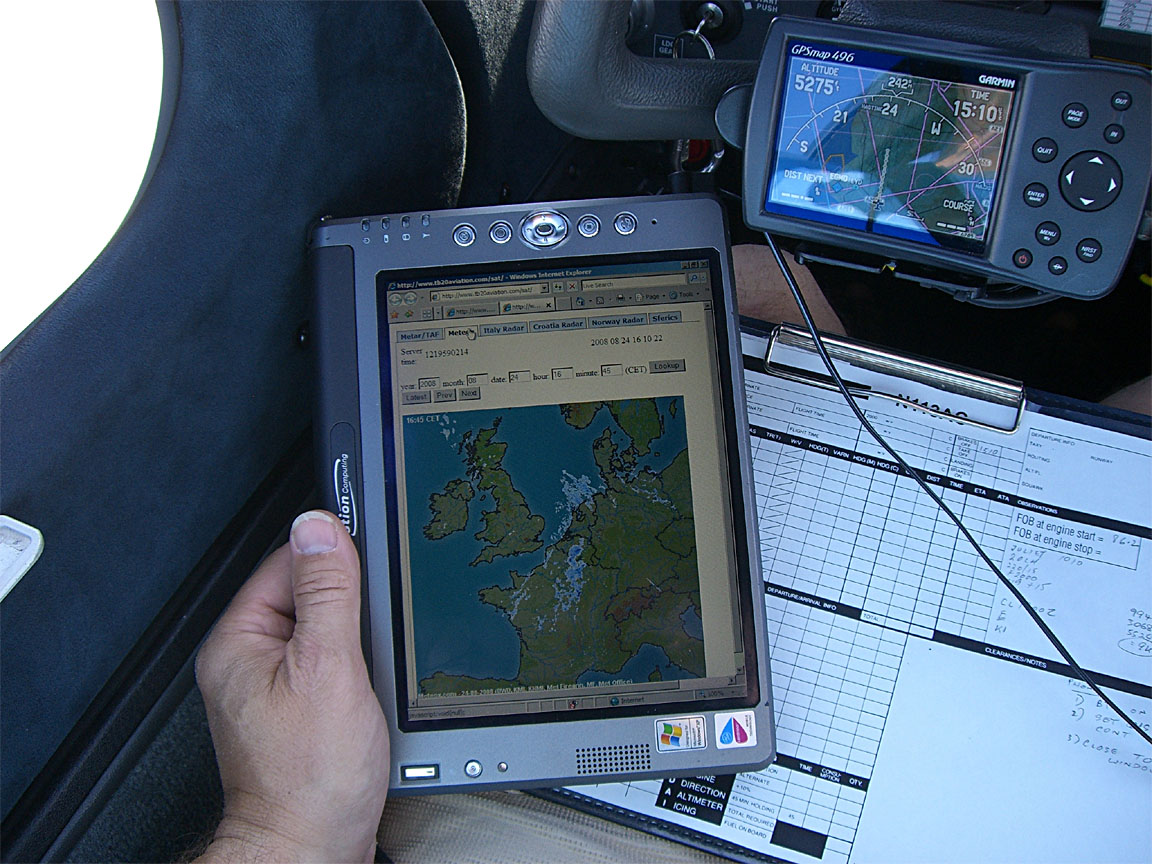
This offers a METAR/TAF facility with periodic updates, several weather radar pages, and sferics pages. The server is a Unix PC running on the end of a 448k-uplink ADSL line so not capable of handling heavy traffic. The proxy server does not visit the websites it uses unless there is a request from the airborne client device - it does not generate any superfluous traffic.
The TAF/METAR page has been optimised to transfer the minimum amount of data, and together with a Hosts file (containing the IP) on the client computer the data is retrieved without a DNS lookup which further improves reliability. Many Thuraya data connections function but with broken DNS capability.
The main weather radar page comes from Meteox. Unfortunately the geographical coverage is more limited than the basemap suggests and the limits are not obvious.... N Italy is not covered, for example.
The Meteox image, shown here pixel for pixel
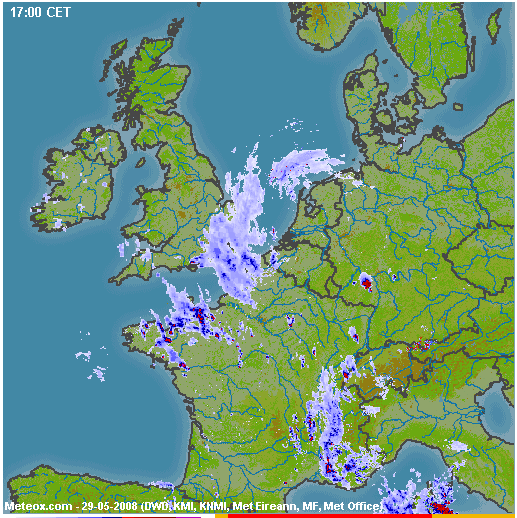
is about 60k but the background map is cached by any normal web browser and only the radar overlay is downloaded - this ranges from zero to around 20k on a really bad day.
On Thuraya GPRS (when it works...) the radar image downloads in a few seconds and - if 20k - costs about $0.10 on GPRS which is peanuts. The total cost of making a connection, collecting a load of METARs/TAFs, and one Meteox radar image, is going to be around $0.20. Even on a dial-up connection, the cost is under $1.00.
The proxy is expandable but any major work would need funding.
Phone and Client Device Configuration
The details are here. There isn't much to do to get a working system, especially with the 7100 connected via a USB data cable.
There is a general reliability issue: satellite data - indeed all mobile data including GSM, GPRS, 3G - is nowhere near as reliable as your home ADSL. There are two separate aspects to this: failure to establish a connection, and a failure to detect (and redial) a broken connection. The first one is handled fine by the Windoze dialer which will just keep redialing until it gets a connection (specifically, until it gets an IP allocated via DHCP; internet access is never actually checked). The second one is more tricky because the data link often breaks a long way upstream which is undetectable other than through the obvious lack of data. The solution is to use a different dialer to the default one; one that periodically (say, every 60 secs) pings some site and hangs up / redials on a ping failure. There are several such products on the market; mainly shareware. I have tried FlexibleSoft XP and HiDialer 2000 of which neither worked properly. However, by the time this project reverted to the Hughes 7100 phone (due to problems with the SG-2520 and also Thuraya's GPRS service) the default Windoze dialer was used exclusively and was found to be OK. Thuraya's dial-up service is fairly reliable.
Operational Recommendations
Phone location is important because a good signal is required for a reliable internet connection. The phone needs a direct unobstructed satellite view - in Europe the satellite will lie to the South East of you. It may be possible to get a good signal with the phone hanging in the centre of the cockpit e.g. between the two front seats but a far better location is right up against a window, oriented vertically. Self adhesive velcro is a suitable attachment method but a piece of insulating tape is just as good! Another simple and totally effective method is to make something with suction cups, and tape the phone to it
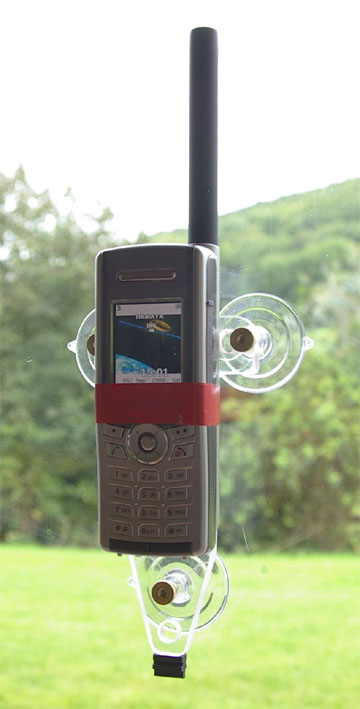
If using the SG-2520 phone, ensure the phone is within your reach because it does occassionally need to be powered down/up to restore operation!
The phone should be switched on while still on the ground, so it has time to get a GPS fix before the aircraft starts to move too fast. The Hughes 7100 is pretty good but the SG-2520 might never acquire the initial position when moving at 150kt.
Interference with other avionics - other than the subdued noise one can hear in ANR headsets when there is an active GSM phone in the cockpit - has not been detected but as a general precaution I strongly recommend not having the phone switched on when flying any instrument approach.
Other Applications
Well, a phone is a phone and can be used for ... making phone calls! On the ground, in modern Europe, this use is likely to be limited because GSM coverage is nowadays very good. However, GSM reception is often poor in the countryside.
With the Bluetooth-equipped Lightspeed Zulu aviation headset it can even be used to make calls while airborne, for airport PPR, taxi booking, etc. I have tested it and it worked although for some reason the voice quality was poor.
And it makes a good emergency device; the ability to simply text your GPS position to somebody is pretty slick.
Being able to text while airborne enables you to let someone know accurately when you will be arriving. This is suprisingly useful.
You can send a text message to a Thuraya phone via the Thuraya website here. There used to be a general email-to-text facility but is now gone - unsuprisingly as it would have suffered massively from spam.
It makes a good enough fax modem which is not affected by a local GSM provider not supporting fax calls.
Thuraya data pricing is pretty good: the $5/MB tariff on Thuraya GPRS is 1/4 of what I pay to Vodafone, and 1/2 the cost of Virgin, for roaming data on GPRS/3G!!
Update September 2009
I have decided to stop using the SG-2520 phone and gone back to the Hughes 7100. The SG-2520 is just too buggy: termination of a call requires manual intervention; one needs to enable bluetooth after every power-up (Thuraya have confirmed this is a design feature so they won't fix it); its bluetooth connection works with only some computers (par for the course for bluetooth); its GPS is useless and cannot reliably get a fix when moving, even in a motor vehicle. Now, Thuraya seem to be having major issues with their GPRS service; it was never reliable airborne but during 2009 it has rarely worked on the ground too. The final straw came with the phone's inability to find the network, on the ground, which magically cured itself the following day when it was returned to the dealer; this appeared to be related to a previous day's airborne use.
The Hughes 7100, however, just works and keeps working and does exactly what it says on the box. The 1722 dialup seems totally reliable and the data rate is consistently to specification. It's only drawback is the need for a data cable connection but that is a very small price to pay.
Thuraya SIM cards are widely sold on Ebay, from sellers in the Middle East. These are "virgin" cards which have never been used and they do not work until one has made a voice call; the first such call connects you to an automated menu where you sleect your country of residence, etc.
A rooftop antenna was installed under an FAA 337 field approval and works fine.
Update November 2010
The 7100 phone still works well, generally. There have been unexplained issues where the phone crashes immediately after a connection is established, showing a blank screen. It has to be powered-down to recover from this state. From tests done with two phones and two computers which show consistent results, this issue may be caused by the network. Thuraya are nonresponsive on this matter.
Thuraya have introduced a new phone - the XT - but I have not found anybody who would lend me one to test.
Update March 2012
I am still using the 7100. The above mentioned crashes seem to be the result of a worn out battery. When the phone establishes a data connection, it draws a lot more power than at other times, and the battery voltage dip crashes it. It does not help that the charger is connected... it seems that the charger circuit design is dumb and the phone still draws battery current even then.
Thuraya seem to have changed their tariffs, such that a certain amount ($30?) is deducted from the PAYG prepay each year, regardless of usage, and they no longer confiscate the remaining balance after 12 months or whatever. This (if true) is much better for occassional use like mine.
I never used the rooftop antenna for real, because the RF interference generated by the crappy Sattrans car holder could not be suppressed. I just use the phone with a USB cable, like this
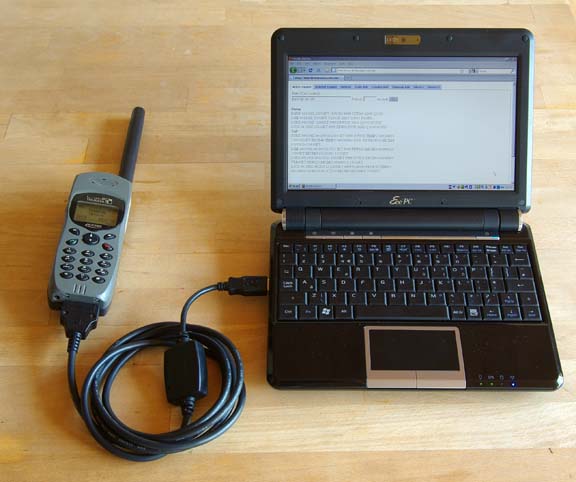
The computer can be anything which supports dial-up networking, which in reality means a Windows device and normally I just use the LS800 which is running in the cockpit anyway. It works fine in the context of a long flight. The above pic shows a WinXP laptop, on which the config for dial-up networking takes only a few minutes.
The main drawback of the 7100 is that if you forget to turn it on and capture both GPS and satellite reception before the aircraft starts to move, it will never get reception. I suspect it would equally never get reception if turned on in a moving vehicle...
Update November 2015
For the last 2 years I have been using a Lenovo T2 tablet which runs Windows 8. Here it is showing the silly "metro" desktop which is almost useless, but underneath it is a normal windows computer, with a dual mode touch screen which works surprisingly well with the traditional windows user interface which was of course never intended for finger operation
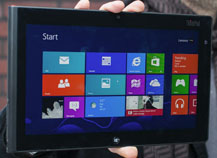
In this case the tablet is used for a very specific purpose so it works OK. The T2 is a robust tablet with good sunlight readability once a matt screen protector is stuck on - better than the Ipad2. Like all the Ipads, it will shut down if it gets too hot, however, and this remains an issue in high altitude flight.
I spent some time working out how to enable/disable the touch screen (two buttons which run two batch files) which is essential for in-flight use to prevent accidental touches - details here.
I also moved from the old Hughes 7100 phone to the newer XT phone
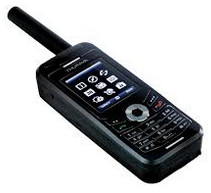
This has an excellent GPS receiver which starts up even during flight. Well, usually... I have seen times when it would not get a fix, but a power cycle fixed that.
The details of the config for the XT are similar to the SG-2520 except the XT does not use bluetooth; it uses a special USB adaptor cable. Config
For data, this has only USB cable connectivity (no bluetooth or wifi) and it offers dial-up internet access (DUN PPP) over this (dialing using the standard *99# GPRS/3G method). Unfortunately this is useless for an Ipad (IOS). On Android there should be a way to get internet over a USB dial-up PPP connection and I spent some time on that but eventually gave up - see here. So you need a Windows computer, which can be a tablet (winXP through to win8) and there are a few of those around, even though IOS and Android pretty well now own the tablet market.
Finally, 3 years too late, in 2015 Thuraya produced Windows 8 drivers for the XT phone - here - so I was able to finally abandon the old 7100 phone.
You need to update the phone firmware, as instructed, and then install the "Thuraya XT upgrader v1.6" which also happens to load the USB drivers.
The data cost on PAYG is about $6.50/MB. There is no per-minute billing, so no need to keep disconnecting the connection.
Thuraya also "remove" an annual amount of approx $40 from your balance, so you can't just put $50 on the SIM card and keep it for 10 years, just in case you need it. This is greedy but is better than what they used to operate which was a confiscation of your entire balance after 3/6/12 months (depending on the size of the last top-up). It is similar to what just about all cellular networks operate on PAYG SIMs which is to terminate the SIM after 90 or 180 days, but at least they don't do the termination if there has been a chargeable event during the period. Thuraya offer the same concession but only on annual usage over about $1500!
Initially I could not get the XT phone to work reliably. This turned out to be because the 50kbits/sec connection was getting killed by various mysterious Windows/IE processes which transferred vast amounts of data. One of the biggest was IE and something called "google cache". Blocking IPs is only temporary because the processes are too clever and soon find another IP. This is partly a consequence of the "always on" GPRS connection which Windows treats as a "network", whereas "dial-up" connections are not normally treated by the O/S as available for these purposes, so the old 7100 phone didn't suffer anywhere near as much.
The issue was eventually comprehensively solved by setting up the Windows firewall to block everything by default (there are global firewall options to "allow everything" or "block everything") and then put in "allow" rules to access specific sites by IP. This works with private aviation weather sites for example. A number of people have set these up; they strip off advertising etc and present just the bare data.
One alternative to limiting oneself to private sites is to do a lot of configuration to block these spurious processes. On winXP this is easy enough but win8 contains a mass of telemetry and other spyware. You must avoid the Chrome browser which is notorious for sending stuff back to Google (and much of this activity is not configurable). Firefox with no plugins should be a start...
A later model XT-DUAL phone has bluetooth but it isn't known if this supports just the old dial-up networking (which cannot be used with IOS or Android) or whether it offers a proper network (which could potentially be used with Android).
There is the new XT-LITE phone which is cheap but does voice and messages only, no data!
The current Thuraya product is their Satsleeve which comes in versions of an Iphone and a Samsung S3. This is probably the best way to go forward, but you still have the WIFI issues which apply to the Hotspot below:
I also tried Thuraya's "XT-Hotspot" WIFI adaptor which connects to the XT phone via USB
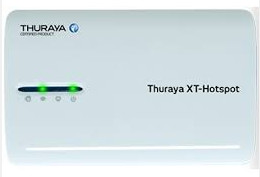
This turns the XT phone into a standard WIFI access point which should enable
the use of any client device. Actually this device is a standard $30 wifi router
with Open-WRT firmware and some custom config... I could not get this device
to work properly. Also, it's obvious that the instant you have a passenger (or
anybody else within range) who logs into the WIFI with their phone, you can
forget that connection  It needs the firewall to be set up.
Update July 2018
The Thuraya XT turned out to be around 90% reliable for getting an internet connection and eventually I went to the Golze ADL150 Iridium based system. This costs 30-40 euros per month which appears to be a lot more than the Thuraya option but in reality the mysterious Thuraya "prepayment balance stealing" billing policies, together with their atrocious customer service, were not any cheaper over the years. It uses a dedicated app (available for IOS and Android only) and due to the very slow data channel on Iridium there is no internet access via this system. It appears to work solidly, which is important, and you get radar and sferics data (georeferenced around the aircraft position and the flight plan programmed into the GPS) plus tafs/metars.
Update September 2018
The Avidyne MLX770 has been discontinued. Garmin are offering a similar sort of product; the GSR56 - discussed here.
I still have the Thuraya XT phone and it still works. It is funny to observe that it may have taken Thuraya 10 years to get their "GPRS" data to work properly! But I use the Golze ADL150 mentioned above, on any nontrivial flight. It works with near 100% reliability.
This page last edited 2nd September 2018
Any feedback or reports of dead links, corrections or suggestions much appreciated:
Contact details

